Help center / AI assistance
Reviewing AI edits
Ask the edit assistant or an AI agent for changes, see them as a before-and-after diff, and accept all, some or none.
AI never changes your timeline by itself. Every change the edit assistant or an AI agent wants to make arrives as a proposal: a list of steps you review as a diff and accept, partly accept or reject. What you accept is one undo step.
Ask the edit assistant
- In Timeline & Grade, open the AI edits tab on the right.
- Type a request, or click an example:
- remove silences over 1s cuts pauses from the dialogue tracks and closes the gaps.
- cut to the beats moves existing cuts onto the beats of the music clip, or cuts every N beats.
- make a 45s Short from the best moment makes a new Short.
- Check the cost estimate and Send. The reply says what it found, and the proposal appears under AI edits to review.
Without a text model on the server the assistant understands requests phrased like the examples; with one, it understands wider phrasing.
Review a proposal
Click a proposal. The timeline area is replaced by the review:
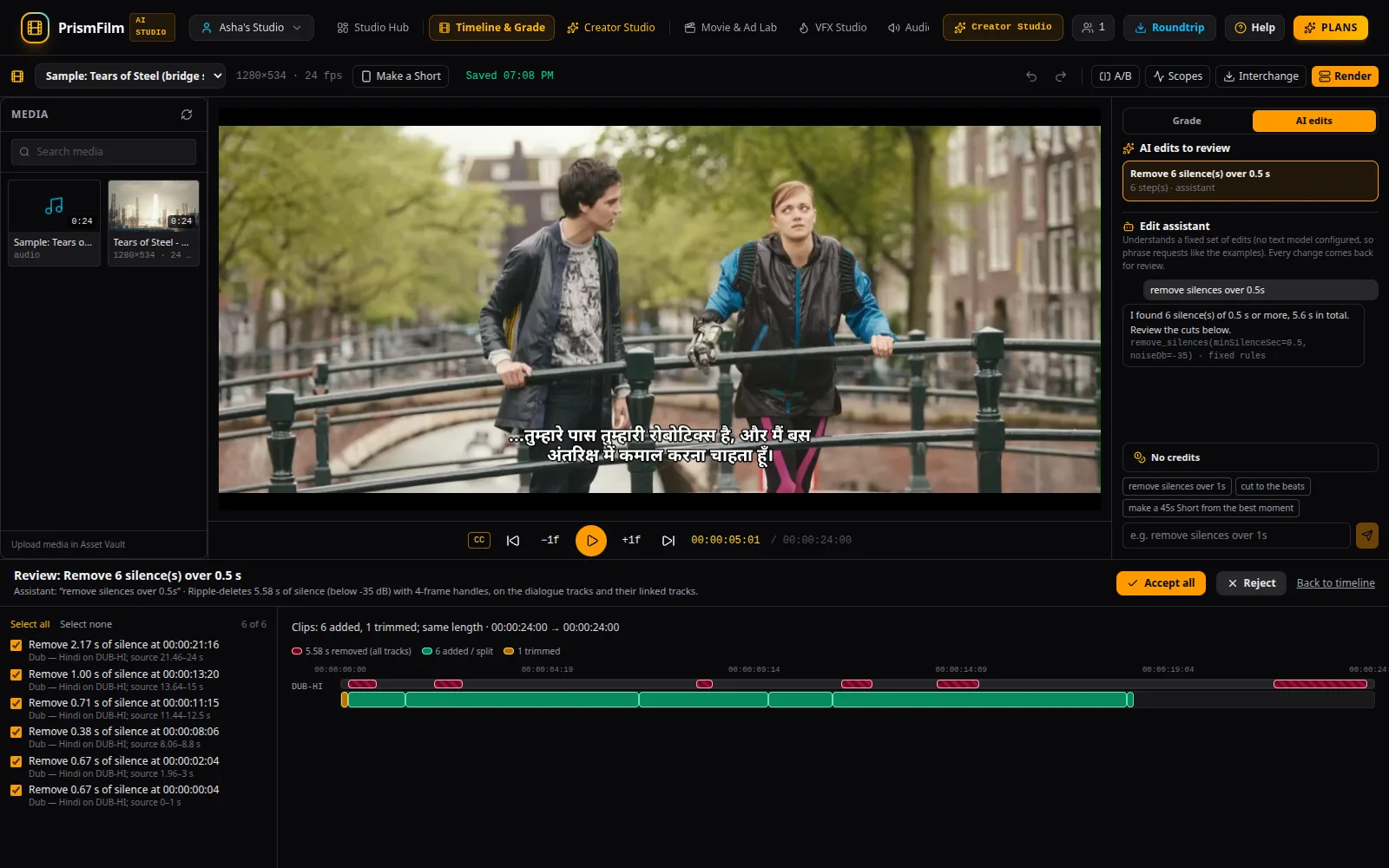
- The steps on the left: tick the ones you want (Select all, Select none). Click a step to jump to it.
- The diff on the right: removed spans are hatched, added, split, moved and trimmed clips are marked, and markers that would move or be removed are listed.
- Accept all (or Accept N of M) applies the ticked steps as one undo step. Reject discards the proposal. Back to timeline leaves it for later.
After accepting, Ctrl+Z undoes the whole proposal at once.
AI agents
The AI Agents view runs longer tasks on a project: the Rough-cut assistant (silence-based cuts), the Grade assistant (a grade from measured frame statistics), and, with a text model, the Metadata writer and Caption proofreader.
- Pick the project and an agent, check its cost estimate, and run it.
- Follow the run's log in Runs.
- Timeline changes come back as a proposal in Timeline & Grade → AI edits, reviewed as above. Titles, descriptions and caption fixes apply directly.
Common problems
- "I found no silences…" Nothing in the dialogue is quieter than the threshold for that long. Try a shorter duration, e.g. remove silences over 0.5s.
- "The timeline changed since this was proposed…" You edited after the proposal was made. Steps that no longer apply are listed; ask again for a fresh proposal.
- "No steps selected." Tick at least one step.
- "Over a monthly budget or the plan quota" on an agent: see budgets.
- Reviewers can see proposals but not accept or reject them.