Help center / Captions, languages and Shorts
Dubbing and voices
Dub a translated caption track with stock voices, assign speakers, check how each line fits, and record voice consent.
Creator Studio → Dubbing & Languages turns a translated caption track into a spoken dub on its own timeline track. Each line is spoken with its speaker's voice and fitted to the timing of the original line. The original dialogue is lowered under the dub, or removed where stem separation is available.
Before you start
You need captions of the original dialogue and a translation of them. See Captions and translations. The sample project already has both, in English and Hindi.
Set up the dub
- In Dubbing setup, choose Original captions (dialogue): the caption track of the original speech.
- Set Max speed-up to fit a line (how much faster a long line may be spoken) and Duck depth.
- Under Original dialogue tracks, tick the tracks that carry the original speech.
Speakers
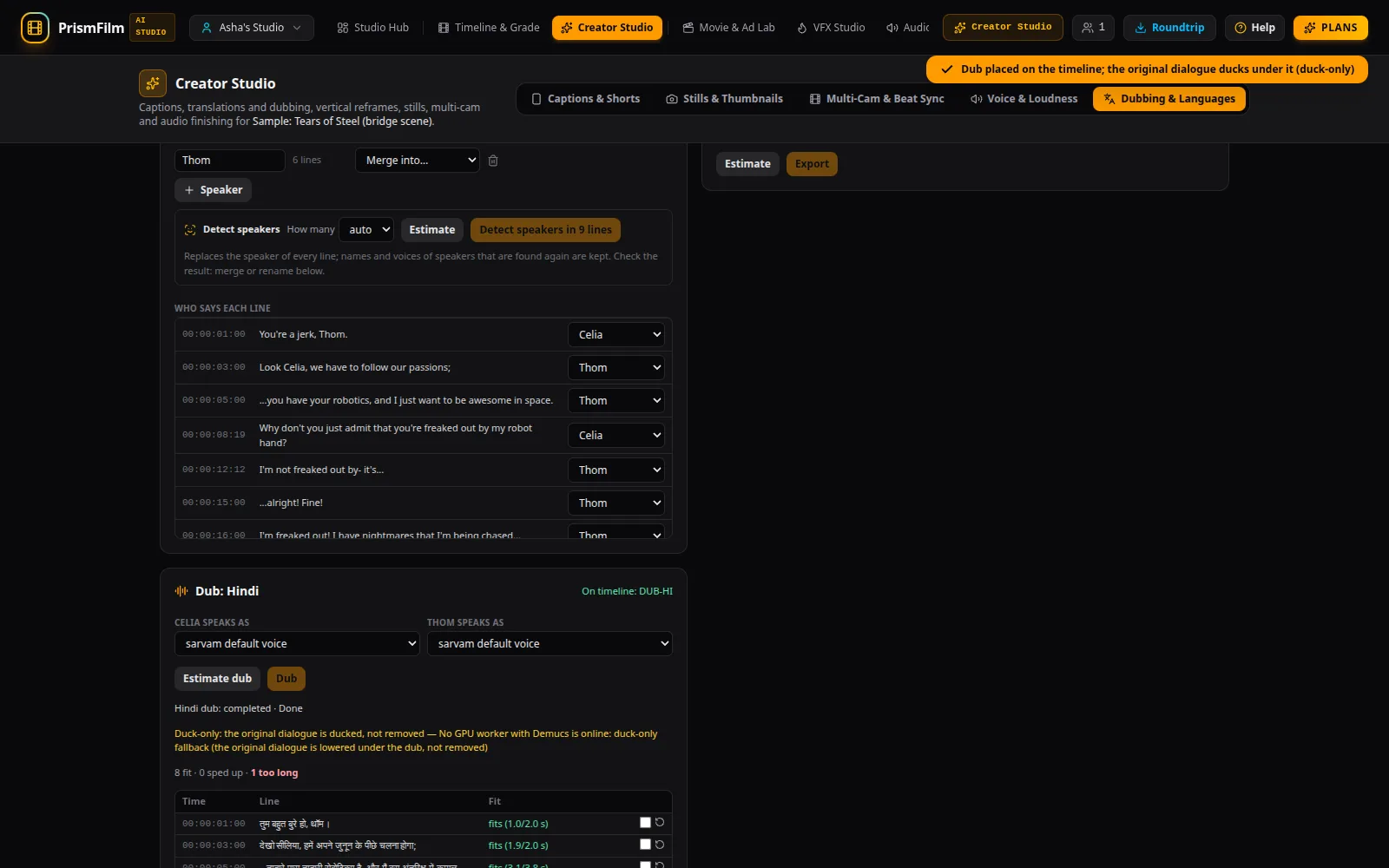
Each line belongs to a speaker. In the speakers list you can rename a speaker, Merge into… another one, add a speaker with + Speaker, and change the speaker of any line under Who says each line.
With a GPU worker online, Detect speakers finds the speakers for you: choose How many (or auto), Estimate, then Detect speakers in N lines. It replaces the speaker of every line; check the result and merge or rename as needed.
Dub a language
- In the Dub: Hindi card (one card per translated language), choose a voice for each speaker under … speaks as.
- Estimate dub shows the lines, characters and credits. The estimate is free.
- Dub speaks every line and places the result on a new track (On timeline: DUB-HI).
- Each line shows how it fit: fits, sped up ×r, or too long: N s cut — shorten it. Shorten the translation of long lines, tick them, and dub again: only the ticked or changed lines are spoken again.
Indian-language voices need a text-to-speech provider on the server. The estimate works without one.
Original dialogue in the export
Under Original dialogue in dubbed exports choose Remove (Demucs stems) or Duck only. Removing needs the GPU worker, which splits the original audio into dialogue and background (music and effects); the dubbed export then plays the background plus the dub. Without the worker the original dialogue is lowered, not removed, and the status says so.
Voice consent
A voice can be cloned only with the speaker's recorded consent. Voice cloning is off by default while the voice model's commercial licence is reviewed; until a platform administrator turns it on, dubs use stock voices and the consent form is hidden. When it is on, it works like this:
- In Voices & consent, choose Record a new consent.
- Enter the Speaker's name and the Language they speak, then Get statement. The statement names the speaker, for example: "My name is Priya. I agree that my voice may be recorded and used to generate synthetic speech in this workspace's PrismFilm projects. I can withdraw this consent at any time."
- The speaker reads it aloud: Record (3–30 seconds, in a quiet room) or Upload a recording.
- Tick This recording is …, reading the statement above of their own free will and Submit consent.
- The recording is checked against the statement. A workspace owner can also verify it by listening.
Revoke consent stops the voice being used immediately. Every use of a cloned voice is recorded in the audit log.
Export every language
Export languages makes One file, an audio track per language or One video per language, optionally with a subtitle track per language. It runs the pre-export QC like any render. Finished files appear in the Asset Vault and the Render Farm.
Common problems
- "Transcribe the dialogue and translate it in Captions & Shorts first…" There is no translated track to dub yet.
- "No text-to-speech provider speaks Hindi: …" The server has no Indian-language voice provider configured. The estimate still works.
- "Duck-only: the original dialogue is ducked, not removed". No GPU worker was online to separate the dialogue.
- "The statement must include the speaker's name". Keep the name in the statement.
- "Could not use the microphone…" Allow microphone access in the browser, or upload a recording.
- "Voice cloning is off." Cloning is disabled on this platform; stock voices work as usual.