Help center / QC and delivery
Rendering and exports
Export a project with a preset, set loudness targets, add or remove a watermark, and download finished files.
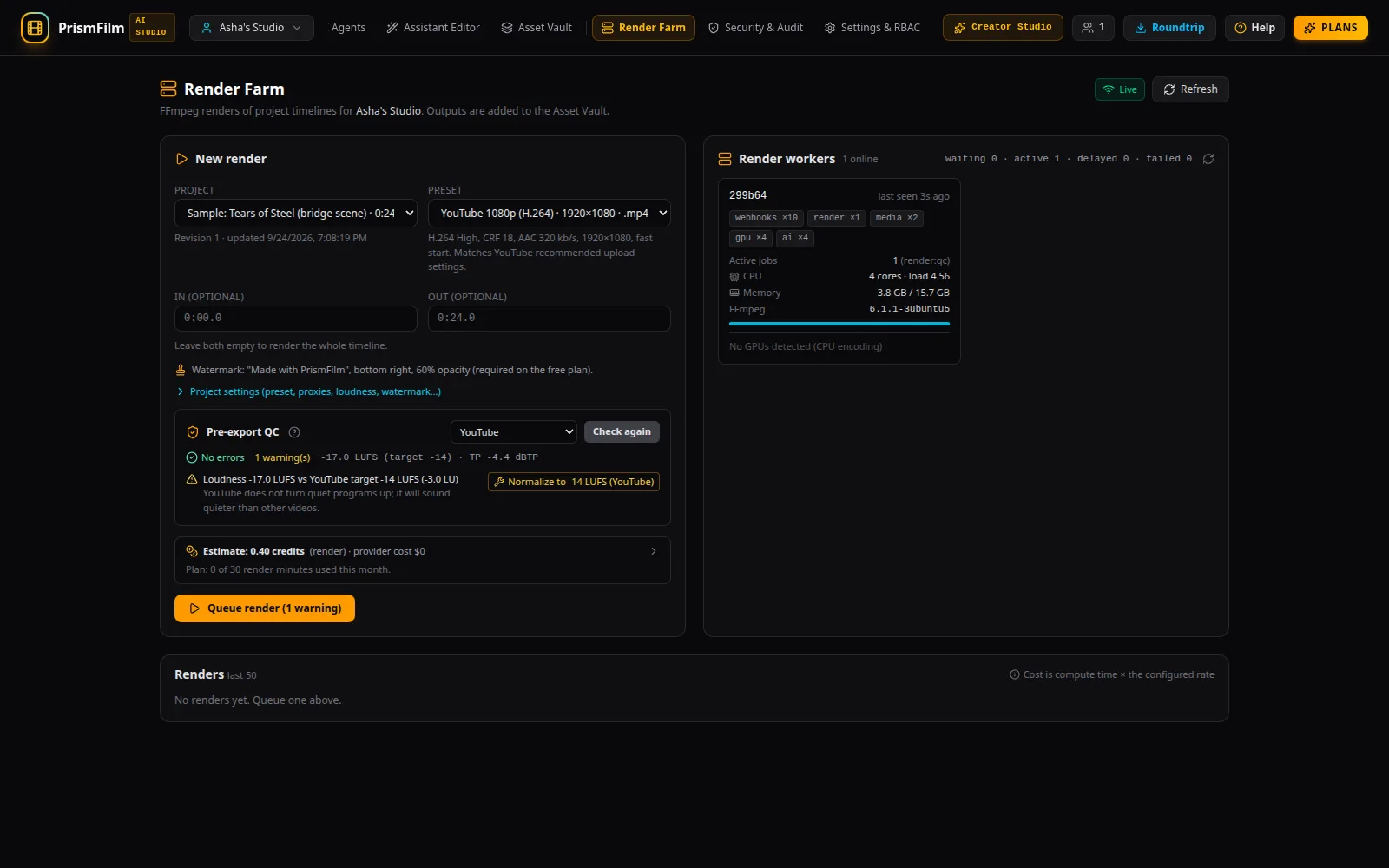
The Render Farm turns a project into a finished file. Renders use your original media (not the proxies), with frame-accurate cuts, and apply grades, LUTs, the mix, VFX, captions and the reframe.
Queue a render
- Open Render Farm (or Render in Timeline & Grade).
- Under New render, choose the Project and a Preset:
- YouTube 1080p (H.264) or YouTube 4K (H.264)
- Shorts / Reels / TikTok 9:16
- ProRes 422 HQ (master) or ProRes 4444 (master)
- Optional: an In and Out point in seconds (
12.5) or minutes (1:02.5). Leave both empty for the whole timeline. - Run the pre-export QC.
- Check the estimate and Queue render.
The render appears under Renders with its progress. You can Cancel, Retry a failed one, and read its Logs. When it finishes, Download it; the file also appears in the Asset Vault.
Loudness targets
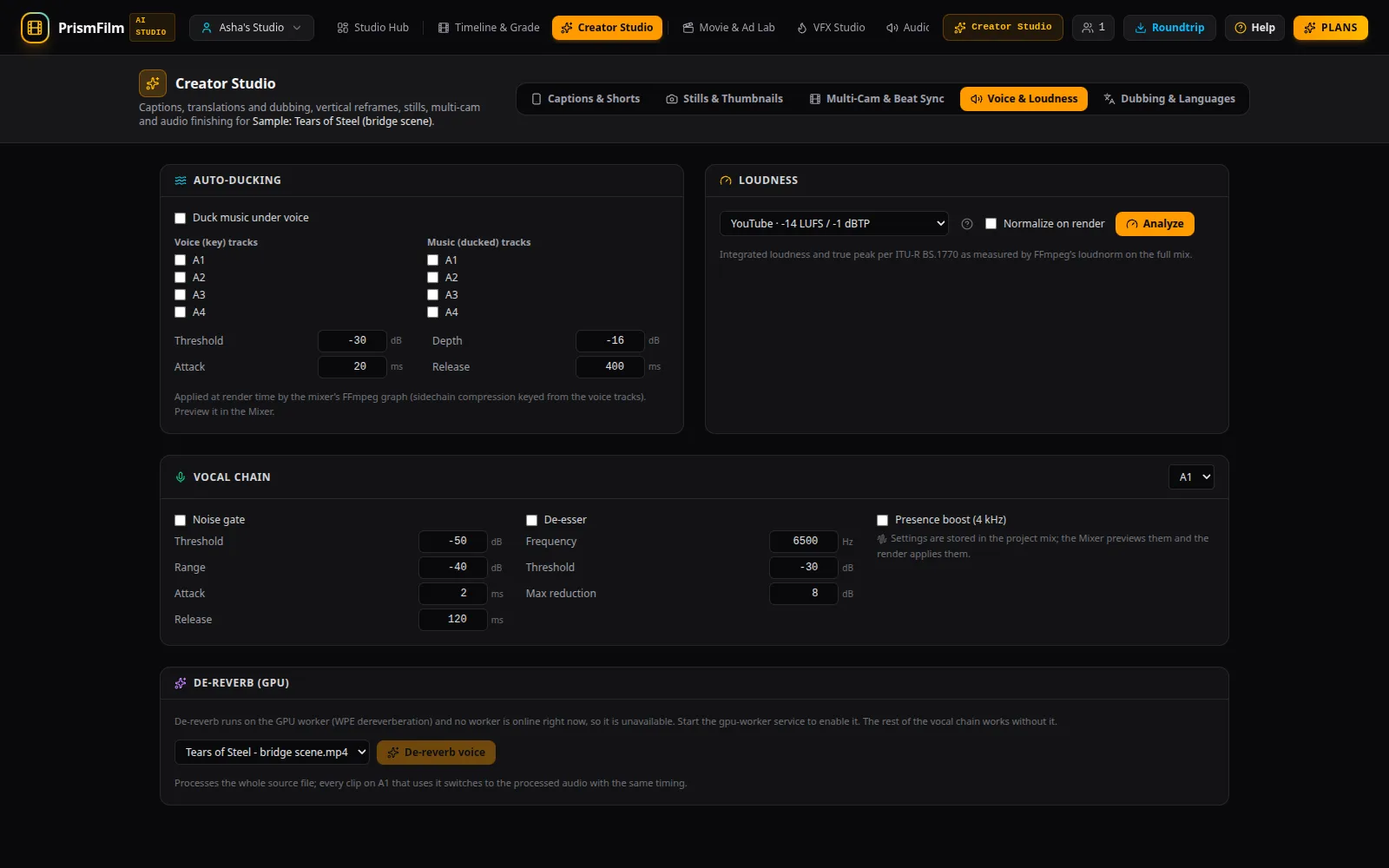
Platforms turn loud videos down, and quiet ones sound weak next to others. Set the target so your mix lands where the platform expects:
| Target | Integrated loudness | True peak |
|---|---|---|
| YouTube | -14 LUFS | -1 dBTP |
| TikTok / Reels | -14 LUFS | -1 dBTP |
| Podcast | -16 LUFS | -1 dBTP |
| EBU R128 broadcast | -23 LUFS | -1 dBTP |
Choose it in Creator Studio → Voice & Loudness → Loudness or in the Audio Mixer's loudness section, turn on Normalize on render, and Analyze to see the measured value before and after. The workspace default is in Settings & RBAC → Pipeline → Loudness target.
Watermark
The line under the preset says what the render will carry. On the Free plan every video render has a visible "Made with PrismFilm" watermark; paid plans can turn it off. Set the watermark (text or an image, position, opacity, size) in Settings & RBAC → Pipeline, or for one project under Project settings (preset, proxies, loudness, watermark…) in the Render Farm.
Project settings
Project settings overrides the workspace defaults for one project: the default preset, proxy resolution, loudness target, still format, safe-zone guides and watermark. Tick Override for this project on a setting and Save project settings.
More ways to export
- Shorts: Render 9:16 (Shorts preset) in Creator Studio's reframe card. See Make a Short.
- Every language at once: Export languages in Dubbing & Languages. See Dubbing and voices.
- Another editor: see hand-off.
Common problems
- "No render workers are running…" Queued renders wait until a render worker starts. Renders show Waiting — no render workers running.
- "Out point must be after the in point" / "Use seconds (12.5) or m:ss (1:02.5)". Check the in and out fields.
- "Over a budget or the plan quota" on the queue button: see budgets.
- "Output processing failed". The render finished but importing the file failed; Retry the render.
- Reviewers can follow renders and download outputs but not queue, cancel or retry them.